How to Build a Reliable Digital Catalog Operations Workflow
A working method for naming a catalog, assigning update rights, setting cadence, and moving every change through the same stages.
- 01 Name the catalog
- 02 Assign ownership
- 03 Set the cadence
- 04 Release the change
Name the catalog before you name the tool
A catalog operations workflow answers four questions before anyone argues about software. What set of records is in scope? Who may change each type? How often is a change expected? What has to be true before that change is released?
The boundary is a sentence a new teammate can repeat. One workable shape is: the public catalog is the set of records offered to customers, and supplier files that have not passed intake are outside it. If the sentence needs a map of every database, it is not a boundary yet. Databases can sit inside the boundary. They are not the boundary.
A record outside the sentence is not updated by this workflow. It may still matter. It needs its own owner. Mixing a supplier spreadsheet and the public record in one unnamed pile is how two teams both believe they are editing the source.
Write the sentence down and date it. When the commercial offer changes, revise the sentence in the same change as the offer. A boundary that lives only in a kickoff deck is already out of date.
Assign an owner to the record type, not to a meeting
Ownership here is an update rule. It says who may change a field, who must be told, and which copy is allowed to win when two copies disagree. A job title on a slide is not that rule.
Write the rule per record type. The person who can correct a public name may not be the person who can retire the record. Those are different changes. The guide to ownership and update rules is where the winning copy is chosen. This page only requires that the choice exists before the cadence starts.
If two teams can both edit the same field and neither rule says which edit stands, the workflow is not ready. Stop and write the rule. Do not pick a winner during an incident and then call that a process.
Roles on this page are functions, not biographies. A source owner accepts or rejects an incoming file. A record owner may change the production fields named in the update rule. A release owner names the set of changes and confirms the log. One person can hold more than one function. The workflow still names the functions separately, so a later split does not have to invent them during a failure.
If a function has no named person this week, write “unfilled” and leave the permission empty. An empty permission is clearer than a shared login that nobody can audit.
Set the cadence before the first recurring update
Cadence is the expected rhythm, not a promise that nothing arrives early. A weekly enrichment batch and an immediate correction of a harmful value are both legitimate. They are not the same path. Name both.
For each path, write three lines: what triggers it, what it is allowed to change, and what “done” means. Done is an exit condition. “The team looked at it” is not an exit condition. “The required fields pass the metadata check and the change is named in the release log” is an exit condition.
A cadence with no exit condition turns into a queue. People add records because the calendar said so, and the records are not ready. The content onboarding checklist is the gate for a record that is entering. The cadence should point at that gate instead of inventing a second, weaker one.
Also name what the cadence is not allowed to do. A weekly enrichment path that quietly retires records will eventually retire the wrong one. Retirement belongs on the correction path, with its own owner.
Use the same stages for every change
CatalogQuay uses four stages for this workflow: intake, check, organize, and release. A team can use its own words. The order is the part that should stay stable.
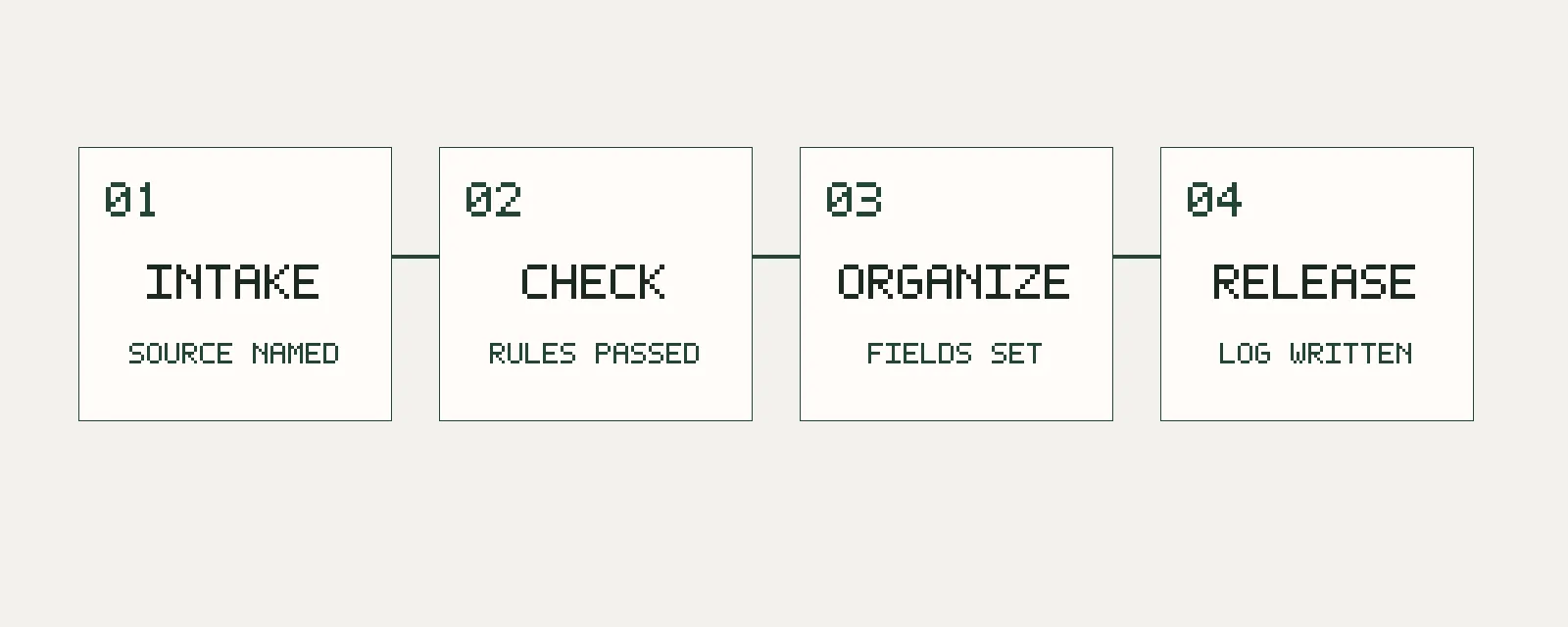
Intake accepts a source inside the boundary and refuses anything that cannot name its source. Check compares the record with rules that were written before this file arrived. Organize puts metadata and classification into the agreed form. Release publishes a named set of changes and keeps a way to undo that set.
A small correction uses the same stages. It does not skip check because the edit is one field. It may use a shorter release window. Skipping the check is how a one-field edit removes a required value. The page on validation, a change log, and rollback describes the release stage. This page only says that release is a stage with a scope, not an unlabeled publish button.
This table scrolls sideways on a narrow screen.
| Stage | Decision | Exit condition |
|---|---|---|
| Intake | Is this source inside the catalog boundary? | The source and the record type are named |
| Check | Does the record meet rules written earlier? | Failures are listed, or the record passes |
| Organize | Are metadata and classification in the agreed form? | Required fields and labels match the current rules |
| Release | Which changes ship together? | The set has a name, a log, and a rollback note |
Keep a short memory of the change
A change record says what was proposed, which rule allowed it, and whether it shipped. It is not a narrative of the meeting. Keep the record identifier, the field, the new value, and the release name. If policy allows the previous value to be stored, store it. If policy forbids that, say so in the change record. Silence reads as a lost edit.
The next person should be able to see why the public record looks like this without asking the person who made the edit. If that person has changed roles, the log is the only memory the workflow has.
Where a published data practice fits
The W3C Data on the Web Best Practices recommendation of 31 January 2017 is about datasets published on the web. It is not a commerce-catalog standard, and this page does not treat it as one. Two of its practices name questions that a catalog workflow can reuse without stretching them.
Best Practice 1 says to provide metadata for human readers and for applications. Best Practice 6 says to provide information about data quality and fitness for a particular purpose. Applied here, those questions become: what would a person need in order to understand this record, and which quality limit should be stated rather than implied?
The stage order, the roles, and the exit conditions on this page are an editorial method. They are not a restatement of the recommendation, and no standards body requires a team to use these four names.
What this workflow does not decide
It does not choose a vendor, a database, or an identifier scheme. It does not rank fields or say that every organization needs a taxonomy on the first day. It does not estimate how long a stage takes. Those facts are local. This publication does not invent them, and it does not borrow numbers from unnamed surveys.
It also does not replace a legal review of what the catalog is allowed to publish. Rights, safety, and jurisdiction stay with the people who hold them. The workflow only makes the operational handoff explicit.
When each decision is needed
When should the catalog boundary be written?
Before the first recurring update. A boundary invented during a dispute describes the dispute, not the catalog.
When needed: At the start of the workflow, and again when the commercial offer changes.
When can two teams edit the same field?
Only after an update rule says which edit stands. Until that sentence exists, a second editor is an accident, not a collaboration.
When needed: Before the cadence is announced.
When is a hotfix allowed to skip a stage?
It is not. A hotfix can shorten the release window. It still needs a check against the rules and a line in the change log.
When needed: Any time a correction is proposed as too small to record.